
Subscribe to our Blog
We're committed to your privacy. SayOne uses the information you provide to us to contact you about our relevant content, products, and services. check out our privacy policy.



Generating table of contents...
A shared drive works fine until it doesn't. Folders multiply, naming gets inconsistent, and nobody is quite sure which version of a contract is the real one.
That moment is usually the first sign a small business has outgrown simple file storage and needs an actual document management system (DMS). The harder question is which kind: something configured out of the box, the Microsoft 365 tools the business may already be paying for, or a system built around how that business actually works.
This guide walks through how to tell which situation applies, what each path actually involves, and where the decision tends to go wrong.
A document management system becomes worth the investment once a business can no longer answer three questions quickly: where is the current version of a document, who is allowed to see or change it, and how long is the business required to keep it.
Shared drives and basic cloud storage handle file storage well. They tend to fall short on a specific set of needs:
Permissions by role rather than by individual file or folder setting.
A retention schedule that flags documents for review or deletion automatically.
An audit trail showing who touched a file, and when.
Search that works reliably across thousands of documents, not a tidy handful of folders.
Industry research from the information management research body, has repeatedly found that manual, ad hoc document handling remains common even as organizations grow, and that this is a recurring source of lost staff time and compliance exposure rather than a problem unique to large enterprises.
A few concrete triggers tend to show up before a business consciously decides it needs a DMS:
Client or partner contracts get signed over email threads, with no single record of which version is final.
An audit or compliance review surfaces a document the business cannot locate, or cannot prove was approved by the right person.
Headcount has grown past the point where everyone remembers the informal filing rules that used to work.
A new regulation or client requirement specifies how long records must be kept and who may access them.
Any one of these on its own might not justify a new system. Two or more happening at the same time usually means the cost of staying on shared drives, measured in lost staff time and compliance exposure rather than a line item on a budget sheet, has quietly exceeded the cost of fixing it.
A document management system is software that stores, organizes, secures and tracks documents through their full lifecycle, from creation through approval to eventual deletion.
At a minimum, it should give a small business four things a shared drive cannot:
Version history that shows exactly what changed, when, and who made the change.
Role-based permissions, so access follows a person's job rather than whoever happened to set sharing settings on a specific file.
Retention rules that flag documents for review or deletion automatically, by document type.
Full-text search across scanned and native files, not just filenames.
Most systems also add workflow features on top of those basics: routing a document for approval, capturing an electronic signature, and logging every action against a document for later review. These features tend to matter more than raw storage capacity for a small business, because the real cost of weak document management is staff time lost to searching, re-creating files that went missing, and settling disputes about which version is the one that counts.
A document management system also has to work as a security control: encryption for documents at rest and in transit, access logs detailed enough to show who opened or changed a given file, immediate access revocation when someone leaves the business, and multi-factor authentication on accounts that can view or approve sensitive categories. These expectations apply just as much to a five-person firm as to a large enterprise, since a smaller business often has less capacity to absorb a data breach or a failed audit.
Many small businesses already pay for Microsoft 365, which raises a fair question before buying or building anything else: does SharePoint already count as a document management system?
For straightforward needs, often yes. According to Microsoft's own documentation, SharePoint document libraries support version history, metadata tagging, permission inheritance, and basic retention labels through Microsoft Purview. A business that mainly needs organized storage, consistent permissions and a searchable library may not need another system at all.
A few patterns show up consistently once a business outgrows SharePoint alone:
Approval chains that branch by document type, where a contract needs a different sign-off path than an invoice or an HR form.
Retention rules that vary by client or contract category rather than by a fixed folder structure.
Tight integration requirements with line-of-business systems outside the Microsoft ecosystem, such as an industry-specific case management or billing platform.
Each of these is technically possible to configure inside SharePoint with enough customization. In practice, once two or more apply at once, the configuration effort starts to look like building a separate system anyway, just on top of a platform that was not designed around that specific workflow.
Once a business has decided SharePoint alone will not cover its needs, the choice is usually between an off-the-shelf DMS product and a custom-built system. The table below lays out how the three paths typically compare.
| Factor | Microsoft 365 / SharePoint | Off-the-shelf DMS | Custom-built DMS |
|---|---|---|---|
| Best fit when | Storage, permissions and light retention cover the need | Standard workflows, e-signature and retention rules match the product's built-in options | Workflow logic, data ownership or integrations are specific to the business |
| Time to get running | Days to weeks, since it is already licensed | Weeks to a couple of months | Several months, scoped like any software project |
| Retention & compliance controls | Basic, via Purview retention labels | Configurable within the product's rule engine | Built to match the business's exact retention and audit requirements |
| E-signature & approval workflow | Limited without add-ons | Usually included or available as a module | Built to the exact approval chain the business uses |
| Integration with existing systems | Strong within Microsoft 365, limited outside it | Depends on the product's prebuilt connectors | Built to connect directly to whatever systems the business already runs |
| Who owns the data model | Microsoft's schema | The product's schema | The business |
Research on the broader content services platform market notes that organizations increasingly weigh platform flexibility and integration reach as heavily as core document features when choosing a system, which matches what tends to decide this choice in practice: rarely a license's sticker price, usually whether its built-in rules and connectors match how the business actually operates.
Pricing structure also differs across the three paths. Microsoft 365 is typically a cost the business already carries. Off-the-shelf DMS products are usually priced per user per month, scaling with headcount. A custom build is priced as a software project, scoped around the workflow, retention and integration requirements identified before work starts.
Because the three paths overlap in places, it helps to walk through the decision in order rather than comparing every feature at once. The flow below starts from what a business already has and narrows down from there.
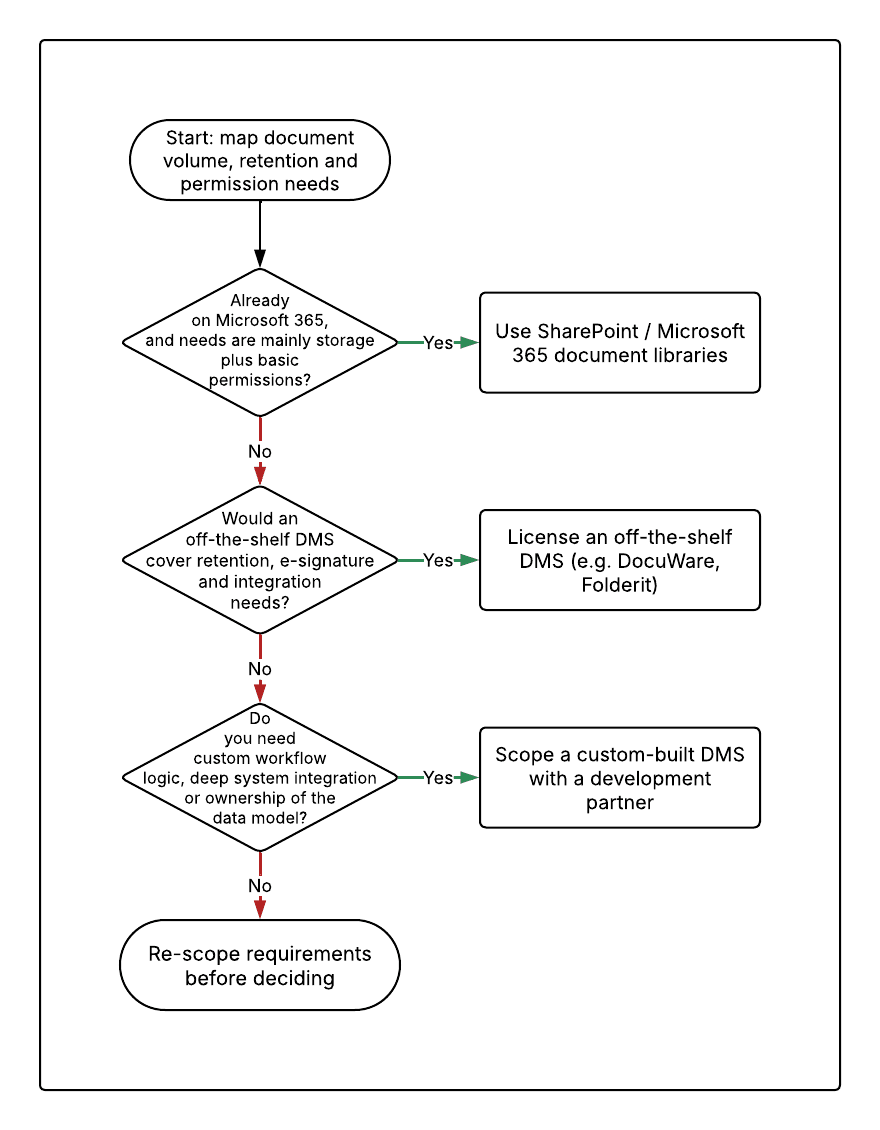
Working through it in sequence avoids a common mistake: evaluating a custom build against a DMS product's full feature list before properly checking whether the simpler Microsoft 365 option was ever ruled out in the first place.
Whichever path a business chooses, two requirements apply regardless of the software: how long records must be kept, and whether an electronic signature on a document is enforceable.
The IRS's recordkeeping guidance sets specific minimum periods for tax-related records, and most legal, HR and client contract documents carry their own separate retention rules depending on jurisdiction and industry, often layered on top of those basic tax-record rules. A document management system should let a business set those periods once, by document type, rather than relying on someone remembering to archive or delete files manually months or years later.
Electronic signatures are legally enforceable for most business contracts in the United States under the federal ESIGN Act and the state-level Uniform Electronic Transactions Act, provided the signer consents to sign electronically and the record is kept in a form that can be accurately reproduced later (overview of federal electronic signature law).
What actually satisfies that reproducibility requirement is a tamper-evident audit trail showing who signed, when, and from what context. The signature image alone does not carry that proof. A DMS or e-signature module that logs this automatically removes a step that is easy to get wrong when signatures are collected ad hoc over email.
A pattern that comes up often in professional services and healthcare back offices illustrates why this decision is rarely about price alone.
A firm handling client files under a retention rule tied to contract type, rather than a single fixed period, will usually find that off-the-shelf products handle this cleanly only when that rule fits the product's standard retention categories. When the retention logic depends on fields unique to the business, such as which regulator a given client falls under, configuring that into a generic product can take as long as building it directly, and the result tends to be more fragile, because it works around the product's data model instead of matching it. A scoped custom build, even a modest one focused only on that retention and approval logic, usually holds up better over time. The deciding factor is rarely document volume; it is almost always how specific the compliance or workflow logic is to that one business.
The reverse is just as common. A business with a standard approval chain and no unusual retention requirements will usually find an off-the-shelf DMS, or even SharePoint alone, perfectly sufficient, and a custom build there would mean paying for flexibility the business will never use. A practical way to tell which side of that line a business sits on: count how many retention or approval exceptions show up in a typical month. A handful of standard document types with one approval path each points toward a configured product; a long list of exceptions tied to different clients or regulators points toward a build.
Whichever direction a business leans, a few steps keep the decision grounded rather than speculative.
Inventory document types and volumes first, including where retention or compliance rules already apply to each type.
Map the current approval chain exactly as it happens today, not as it should happen in theory. Informal exceptions matter here.
Test whether Microsoft 365's native tools cover the result before evaluating any other product. This step alone rules out a new purchase for some businesses entirely.
Only move to a custom build once a specific workflow, integration or data-ownership requirement has been named and cannot reasonably be configured into an existing product.
Pilot with one document type or department before rolling a new system out company-wide, so retention rules and permissions can be corrected early.
Budget for migration, not just the new system. Moving years of files out of shared drives and training staff on new permission rules usually takes longer than setting up the software itself, and skipping this step is the most common reason a new system stalls after launch.
One more thing worth checking during that inventory: whether a candidate product or build can connect directly to the accounting platform, the CRM, or whatever case management tool the business already runs. A document management system that cannot end up creating a second silo instead of removing one.
For more on where this is heading as these systems add AI-assisted search and classification, see how AI is changing document management.
Most small businesses only need to get this decision right once if they do the groundwork first. SayOne's team works through exactly this kind of scoping, often starting from SayOne's EDMS development work, before recommending whether a product configuration or a custom build is the better fit.
If document volume, compliance requirements or approval workflows have outgrown what shared drives can handle, get in touch with our team to work through which of these three paths actually fits.
Microsoft 365 covers core document management needs through SharePoint document libraries, including version history, metadata and basic retention labels through Microsoft Purview. It falls short once a business needs multi-step approval workflows that vary by document type, retention rules tied to fields outside Microsoft's data model, or deep integration with systems outside the Microsoft ecosystem.
Cost depends mainly on workflow complexity rather than document volume. Off-the-shelf DMS products are typically priced per user per month and scale with the number of people who need access, while a custom build is priced as a software project scoped around specific retention, approval or integration requirements. Businesses already licensed for Microsoft 365 often start at no added software cost by testing SharePoint's native tools first.
Shared drives store files but do not track who changed a document, enforce retention schedules, or route documents for approval. A document management system adds version control, role-based permissions, automatic retention flags and audit trails, which become necessary once a business can no longer confirm who approved a document or how long it must legally be kept.
Retention periods vary by document type and jurisdiction, and tax-related records carry specific minimum periods set by tax authorities such as the IRS. Legal, HR and client contract records usually carry separate rules depending on industry and location, so retention schedules should be set per document type rather than applied as one blanket rule.
Yes, in the United States, electronic signatures on most business contracts are enforceable under the federal ESIGN Act and state-level Uniform Electronic Transactions Act, provided the signer consented to sign electronically and the signed record can be reproduced accurately later. Legal enforceability depends on the audit trail captured around the signature, so a system that logs who signed, when and from where carries more weight in a dispute than a saved image of a signature by itself.
A custom build tends to make sense once retention or approval logic depends on fields or rules specific to the business, such as client-specific contract categories, rather than a standard workflow a generic product already supports. Forcing a specific requirement into a product built around a different default pattern often takes as long to configure as building it directly, with a more fragile result.
We're committed to your privacy. SayOne uses the information you provide to us to contact you about our relevant content, products, and services. check out our privacy policy.


We collaborate with visionary leaders on projects that focus on quality