
Subscribe to our Blog
We're committed to your privacy. SayOne uses the information you provide to us to contact you about our relevant content, products, and services. check out our privacy policy.



Generating table of contents...
"How much does an LMS cost?" sounds like a simple question. It isn't. The answer depends on whether you're comparing a per-user subscription, a flat-fee tier, or a custom build, and those three paths behave completely differently as your organization grows.
Most buyers start by comparing sticker prices on platform pricing pages. That comparison becomes unreliable almost immediately, because licensing fees and custom development costs aren't denominated the same way: one scales with headcount, the other scales with scope. This guide walks through what drives the price of each approach, what the sticker price on a SaaS plan typically leaves out, what a custom build actually costs and where that money goes, and how the two paths compare once you run the numbers over a five-year horizon rather than a first-year quote.
Three variables drive most of the difference between LMS quotes: how the plan counts users, how much configuration and integration your organization needs, and how long you intend to keep the system in place.
Licensing-based LMS platforms (Docebo, TalentLMS, 360Learning, and similar platforms) price primarily on user count, feature tier, or both. Custom development prices on scope: the features you build, the systems you integrate with, and the ongoing engineering required to keep it running. A platform that looks inexpensive at 50 users can become the more expensive option at 5,000, and a custom build that looks expensive in year one can become the lower-cost option by year three if your requirements are stable enough to justify it.
Off-the-shelf LMS pricing generally falls into two models:
Per-user or active-user pricing charges per registered or monthly-active learner, typically ranging from a few dollars to over twenty dollars per user per month depending on the platform tier and feature set. This model is predictable at small scale and painful at large scale, because the bill grows linearly with headcount even when per-learner usage doesn't.
Flat-fee or tiered pricing charges a fixed monthly or annual fee for a band of users (say, up to 500 or up to 2,000), with feature access bundled into each tier. This caps the bill within a band but creates a cliff: cross the threshold by one learner and the next tier can mean a large jump in cost.
Research firm Capterra's LMS pricing breakdown found that both structures commonly hide additional charges for implementation, premium support, and advanced reporting outside the quoted per-user or per-tier rate. Those costs rarely show up in the number a sales page leads with.
The quoted licensing fee is rarely the full cost of running the platform. Four categories typically sit outside it:
Implementation and data migration
Moving existing courses, learner records, and completion history into a new platform is usually billed separately, and larger migrations can take weeks.
Integrations
Connecting the LMS to your HRIS, SSO provider, or content authoring tools is often a paid professional-services engagement rather than something included in the base plan.
Content and authoring tools
Many plans meter authoring seats, SCORM/xAPI content packages, or storage separately from the learner-seat price.
Support tiers
Faster response times, a dedicated account contact, or priority onboarding are frequently gated behind a higher-priced plan.
None of this means licensing is a poor choice. For many organizations it's clearly the right one, and the number on the pricing page is simply a starting point: the full annual cost usually runs higher once implementation, integrations, and support tiers are added in.
A custom build has no per-user fee, but it isn't free either. The spend concentrates in a few areas: discovery and requirements (mapping the workflows, roles, and compliance rules the system needs to support), core platform engineering (course delivery, progress tracking, certifications, reporting), integration work (HRIS, SSO, content standards like SCORM or xAPI, and any line-of-business systems the LMS needs to talk to), and ongoing maintenance once the system is live.
That last category matters more than buyers usually expect. A custom LMS doesn't have a platform provider patching it on a release schedule; your organization (or your development partner, under a support agreement) owns security updates, browser compatibility, and feature requests going forward. Teams considering a custom build should budget for that as a recurring line item in every year after launch.
The table below lays out how the three common approaches compare on the dimensions that actually move your total spend, rather than the first-year quote alone.
| Approach | Pricing structure | Cost behavior as users grow | Customization & integration depth | Who carries ongoing maintenance |
|---|---|---|---|---|
| Per-user SaaS licensing | Charged per registered or active learner, monthly or annually | Scales linearly with headcount; can overtake custom-build cost at high volume | Limited to what the platform's settings and marketplace integrations support | The platform provider, as part of the subscription |
| Flat-fee / tiered SaaS licensing | Fixed fee per user band or tier | Flat within a band, then jumps at each tier boundary | Moderate; tied to the tier's included features | The platform provider, as part of the subscription |
| Custom LMS development | One-time build cost plus an ongoing maintenance budget | No per-user fee; cost is tied to scope and complexity, not headcount | As deep as the organization is willing to engineer and fund | The organization, or its development partner under a support agreement |
A first-year price comparison almost always favors licensing, because the custom build's upfront engineering cost is concentrated at the start while the SaaS plan's cost is spread evenly across the year. The comparison changes once you extend the horizon, because licensing fees compound with user growth while a custom build's largest cost is already sunk after launch.
The decision flow below walks through the questions worth answering before assuming either path is the economical one: how stable your user count is likely to be, how much integration and compliance depth you actually need, and how long you expect to keep the system in place.
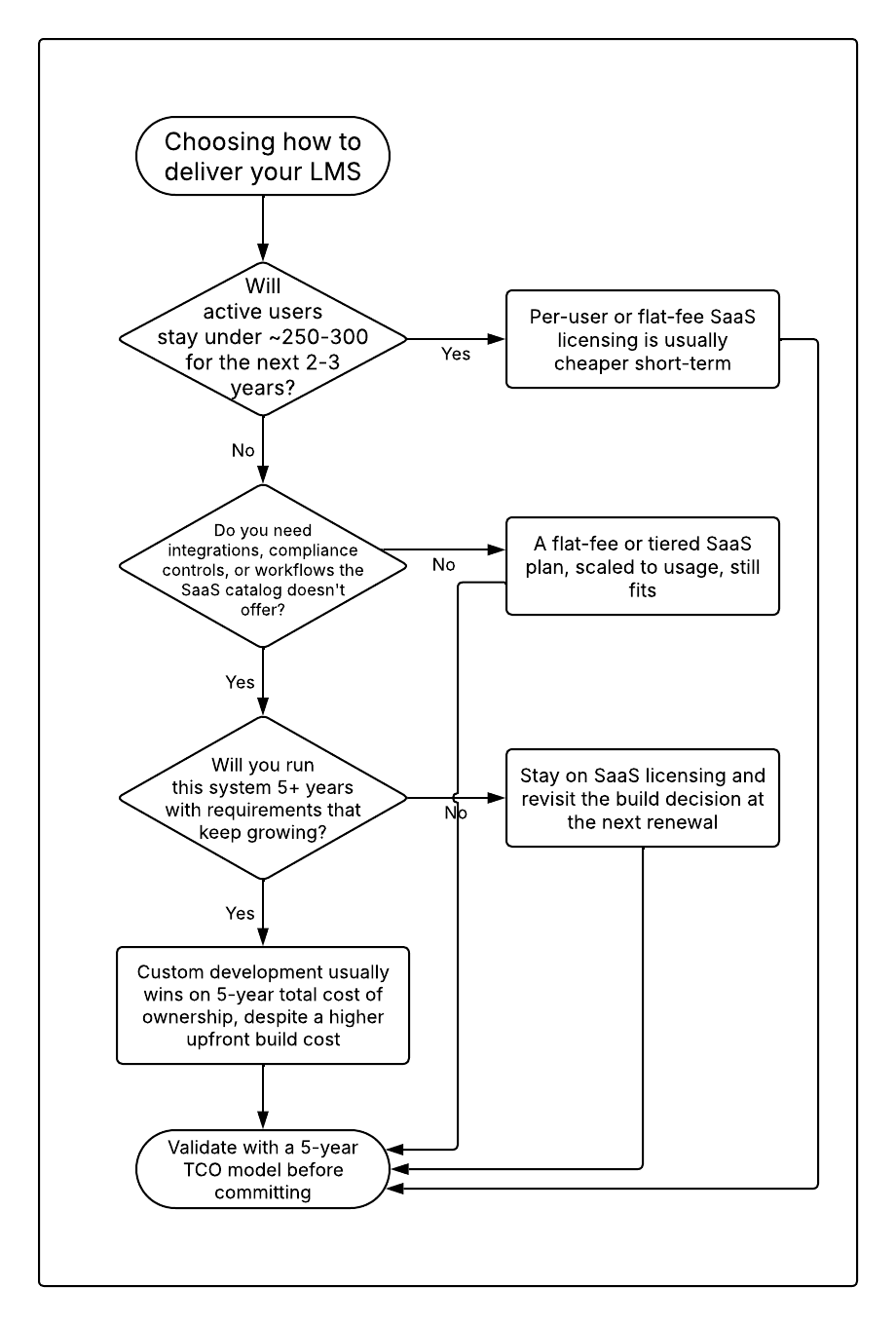
Gartner's most recent worldwide IT spending forecast put total 2026 enterprise software spending growth at double digits, which is part of why many L&D and IT leaders are being asked to model total cost of ownership rather than approve the first quote that arrives.
Custom development tends to win the five-year comparison when several of the following are true at once:
Your user count is large enough, or growing fast enough, that per-user fees would compound into a bigger number than a build-and-maintain budget.
You need integrations or compliance workflows (industry-specific certification tracking, a particular HRIS, a specific SSO setup) that off-the-shelf platforms handle poorly or charge heavily to support.
You expect to run the system for five or more years with requirements that keep evolving, so the build cost amortizes over a longer useful life.
Learner data, course IP, or audit requirements make owning the platform outright a priority rather than depending on a provider's roadmap and pricing changes.
Teams that start on a per-user plan while onboarding a modest, fairly stable group of learners commonly run into a different problem within a couple of years: headcount grows faster than expected, the per-user bill scales past what a custom build would have cost by then, and the organization ends up re-platforming under time pressure instead of on its own schedule. Running the five-year comparison before committing, rather than after the first renewal notice arrives, is what avoids that outcome.
If your organization already has a learning platform and the open question is less "build or buy" and more "is our current setup paying for itself," the benefits and limits of owning a custom LMS outright are worth a closer look in SayOne's guide to custom LMS development.
A few direct questions settle most build-versus-buy debates faster than a spreadsheet alone:
What does the platform charge once we cross our next likely headcount threshold, in writing, not as a verbal estimate?
What is included in the base implementation fee, and what is billed as a separate professional-services engagement?
If we build custom, who owns security patches, accessibility updates, and browser compatibility a year after launch, and what does that support commitment cost annually?
Are we optimizing for the lowest cost in year one, or the lowest total cost over the period we actually expect to run this system?
SHRM's 2026 L&D benchmarking research found that these technology decisions increasingly involve a broader buying committee spanning IT and finance alongside L&D, weighing total cost and integration fit alongside sticker price. Analyst coverage from Fosway Group's learning systems comparison shows a similar pattern: buyers increasingly shortlist platforms by integration depth and total cost of ownership rather than by per-seat price alone. Bringing finance and IT into the comparison early, rather than after a platform has already been selected, tends to produce a more defensible decision either way.
If your current platform already has the data you need but not the intelligence layer, SayOne's work on AI-powered enterprise LMS capabilities for corporate training shows what can be added before a full re-platforming decision is necessary.
If you're ready to model the five-year cost of each path against your own user growth and integration requirements, SayOne's LMS software development team can help you run that comparison against your actual numbers, rather than a generic benchmark.
Whichever direction the numbers point, it's worth running that five-year model before signing anything. If you'd like a second set of eyes on the comparison, get in touch with SayOne's team and we'll help you work through the assumptions.
Per-user LMS pricing commonly runs from a few dollars up to more than twenty dollars per learner per month, depending on the platform tier, feature set, and whether support and advanced reporting are included. Flat-fee platforms instead charge a fixed amount for a band of users, so the effective per-user cost falls as you approach the top of that band and jumps once you cross it. The quoted rate rarely includes implementation or integration work, so it is a starting point for budgeting rather than the full annual figure.
It depends on user count and how long you plan to run the system. Custom development has no per-user fee, so its relative cost advantage grows as headcount increases or as the organization commits to running the platform for five or more years. At smaller scale or shorter time horizons, licensing is usually the more cost-effective choice because the upfront engineering cost of a custom build has less time to be absorbed.
Most quoted LMS prices exclude implementation and data migration, integration work with systems like an HRIS or SSO provider, content authoring tools or storage beyond a base allotment, and faster support tiers. Buyers who only compare the headline per-user or per-tier rate across platforms often underestimate the first-year total by a meaningful margin once these line items are added.
Yes, a number of platforms offer free tiers or open-source LMS software with no licensing fee, and these can work well for very small teams or simple course delivery. The usual compromise is reduced support, limited integrations, caps on user count or storage, and less mature reporting and compliance tracking, so organizations with HRIS integration needs or audit requirements typically outgrow these options quickly.
A SaaS platform can often go live within weeks once content and learner records are migrated, because the core system is already built. A custom LMS build typically needs several months for discovery, core development, integration work, and testing before launch, since the platform is being engineered around your specific workflows rather than configured from an existing product.
The clearest signals are a per-user bill that keeps climbing as headcount grows, integration or compliance requirements that your current platform handles poorly or charges heavily to support, and a multi-year commitment to running the system with requirements that keep evolving. Organizations seeing two or more of these at once are usually past the point where a five-year cost comparison favors staying on a licensed platform.
We're committed to your privacy. SayOne uses the information you provide to us to contact you about our relevant content, products, and services. check out our privacy policy.

We collaborate with visionary leaders on projects that focus on quality