
Subscribe to our Blog
We're committed to your privacy. SayOne uses the information you provide to us to contact you about our relevant content, products, and services. check out our privacy policy.



Generating table of contents...
Your dev team just told you the release is delayed. A deployment pipeline broke overnight. The root cause is a password buried inside a script that expired silently while nobody knew it existed.
This is not hypothetical. It happens every week inside companies using Azure DevOps without a properly structured credential management strategy. And fixing it after the fact costs far more than preventing it ever would.
If your organization runs software on the Microsoft Azure stack, understanding what a service connection in Azure DevOps does, even at a high level, changes how you evaluate your team's setup, your security posture, and your deployment reliability.
Key Takeaway A service connection is the mechanism Azure DevOps uses to authenticate your automated pipelines to external systems including cloud infrastructure, code repositories, container registries, without exposing raw credentials in your codebase. When set up correctly, it's invisible infrastructure. When set up poorly, it's the single point of failure that takes down your release cycle.
Here's something that surprises most business leaders when they first hear it.
When a development team sets up automated deployments, those pipelines would require the use of passwords, access keys, or tokens for accessing cloud environments like Azure. The easy and wrong way to handle this is to paste those credentials directly into the pipeline's configuration files.
They are technically hidden from public view. Yet they are sitting in code repositories that dozens of engineers can access. They expire without warning. They get copy-pasted into new projects. And when one leaks, it's often months before anyone catches it.
Stolen credentials were the initial attack vector in 22% of all data breaches in 2025, according to Verizon's Data Breach Investigations Report. This makes it the single most common entry point attackers use. Breaches where credentials were stolen took an average of 246 days to identify and contain, with costs averaging $4.67 million per incident.
That context matters. Because what we're really talking about when we talk about Azure DevOps service connections is credential exposure and whether your pipelines handle it safely or dangerously.
In plain terms, a service connection is a secure, named entry in Azure DevOps that stores the authentication details your pipelines need, without ever putting those details into your code.
Think of it this way. Your deployment pipeline is like a delivery driver. That driver needs access to your warehouse (Azure infrastructure), a third-party shipping terminal (Docker registry and container services), and a parts supplier (GitHub repository). Instead of giving the driver a physical set of master keys that they carry around and could lose, you issue a secure access badge. The badge grants only the access needed, logs every entry, and can be revoked instantly if something goes wrong.
That's what a service connection does in Azure DevOps. The pipeline references it by name. Azure DevOps handles the authentication silently in the background. Your actual credentials are never visible inside the pipeline code.
Microsoft's security benchmark guidance is unambiguous on this: pipeline YAML files, environment variables, and configuration files stored in repositories are the primary routes through which credentials get exposed in DevOps environments. Service connections are the architecture designed to close those routes.
You don't need to configure service connections yourself. But you do need to know whether your team has configured them correctly because the consequences of getting it wrong fall on the business.
Here's what poor service connection management actually looks like from a business standpoint:
When a credential stored in a pipeline script expires, every pipeline that references it fails simultaneously. Your team doesn't know why. Finding the root cause takes hours during which releases get pushed and customers notice.
Credentials embedded in code repos don't get rotated. They sit there but 64% of secrets that were accidentally exposed in code repositories in 2022 were still active in 2026, according to GitGuardian. That's a multi-year attack window, your team may not even know exists.
Regulations in fintech, healthcare, and enterprise SaaS require documented evidence of who accessed what credentials and when. Hardcoded secrets offer no audit trail, only service connections do and every authentication event is logged automatically in Azure DevOps. Teams that track DevOps performance metrics alongside security posture tend to catch these gaps much earlier.
If your team spends significant time chasing pipeline failures, a large share of that effort may trace back to improperly managed connections. From the outside, it feels like a technical problem, but it's actually a drawback in infrastructure governance.
Azure DevOps supports connections to a wide range of external systems. Each type is purpose-built for a specific integration. A well-governed deployment setup will typically include several.
The Azure Resource Manager connection is the one that matters most for cloud deployments. It gives your pipelines the authority to spin up infrastructure, deploy applications, and manage resources inside your Azure subscription.
The GitHub connection ties your code repository to your pipelines, so that when a developer pushes new code, the right build process kicks off automatically.
The Docker and Kubernetes connections handle the container world, getting packaged software images to the right runtime environments without manual handoffs.
Each type has its own authentication options, its own scope settings, and its own permission model. Having a consistent strategy across all of them is what separates a stable DevOps setup from one that generates unexplained failures.
There are three main ways a service connection authenticates to Azure. Understanding the difference helps you ask the right questions when reviewing your team's setup.
This is the original method where your pipeline connects using an app identity (the service principal) plus a password-like secret. It works, but secrets expire, typically every one to two years. When they do, pipelines fail until someone regenerates and updates the secret manually.
A step up. Azure manages the identity and its credentials automatically. No secrets to track or rotate. Available when your pipelines run on Azure-hosted infrastructure.
The current gold standard. Your pipeline authenticates using short-lived, auto-renewed tokens exchanged with Microsoft Entra ID. There are no stored secrets at all, nothing to expire, nothing to rotate, nothing that can be leaked. Microsoft now recommends this approach for all new Azure connections.
If your team is still using the first method for production connections, that's the most immediate thing worth reviewing.
Getting connections in place is only half the picture. How they're organized and secured is what makes the difference in practice.
The businesses with the fewest pipeline incidents tend to follow a consistent set of principles:
Development pipelines should never have access to production infrastructure. Separating connections by environment, Dev, QA, Staging, Production, means a mistake in a test pipeline cannot touch live resources.
An Azure Resource Manager connection doesn't need to cover your entire subscription if a pipeline only deploys to one resource group. Scoping it tightly limits what can go wrong if something is ever misconfigured.
Azure DevOps gives you the option to grant a service connection to all pipelines at once. For anything touching production, that's too broad. Authorizing only the specific pipelines that need each connection adds a layer of control that's easy to maintain.
Every time a service connection is used, Azure DevOps records it. These logs tell you which pipelines accessed which resources and when. That's the audit trail compliance teams need and it's only useful if someone looks at it.
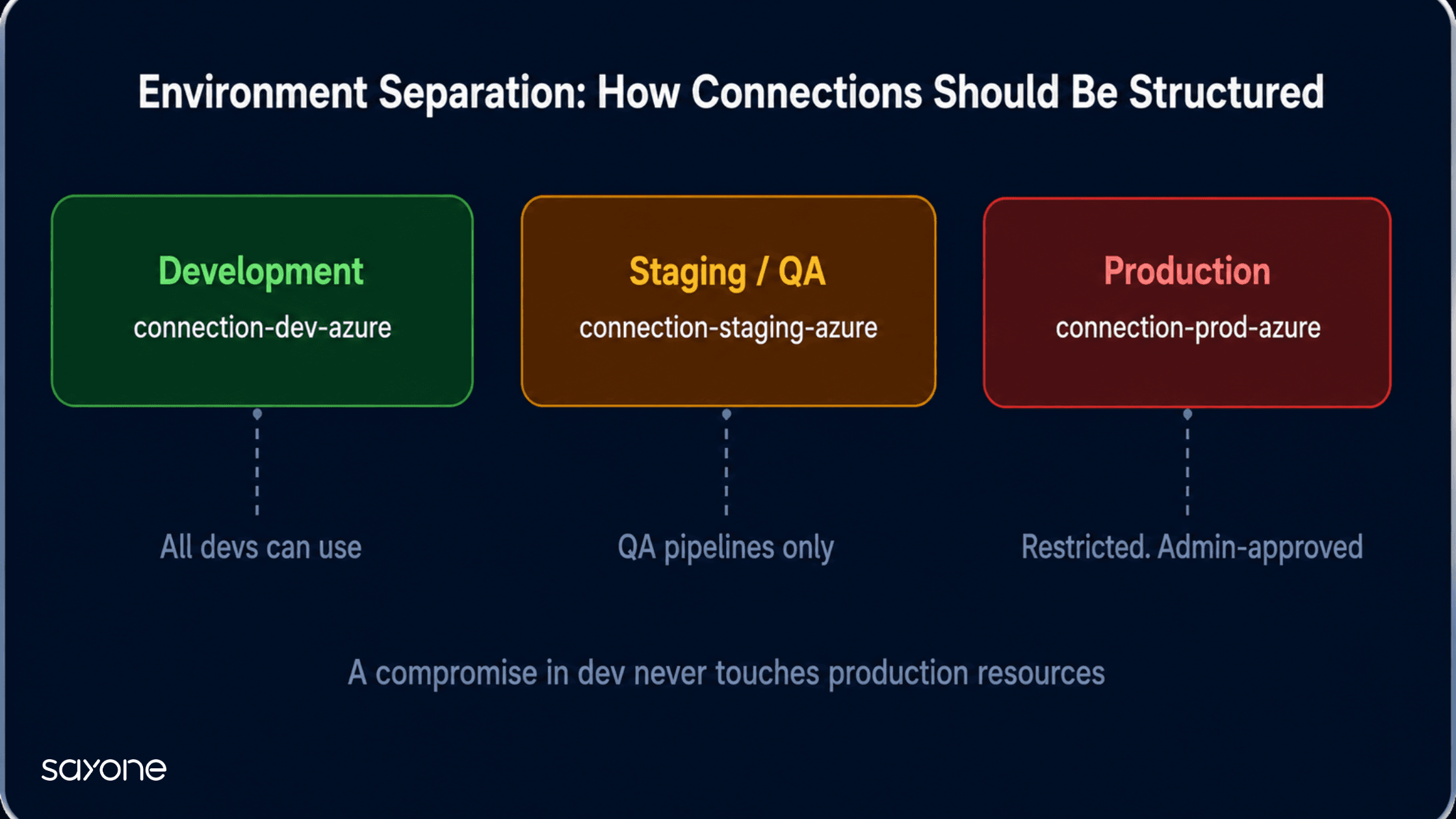 Environment-separated connections contain failures, a best practice endorsed by Microsoft's engineering playbook.
If your company has been using Azure DevOps or is considering to adopt Azure DevOps, then the setup of service connections will be among the most strategic configurations within the whole process.
The teams that understand how to use it will be able to run pipelines that will be delivering releases successfully, scaling without issues, and meeting security audits without an immediate rush. Top performing DevOps teams release software 46 times more often than the low-performing teams and fix the problems 96 times faster. Service connections are essential as they make everything else trustworthy.
For those looking at developing their enterprise-level Azure DevOps maturity, the next step is to manage service connections via Infrastructure as Code. By using tools like Terraform or Bicep, service connections become versioned, auditable, and reproducible. That’s where credential management becomes more of a governance issue than a troubleshooting issue.
You don't need technical depth to start this conversation. These questions surface the most common risk areas:
The answers reveal whether your Azure DevOps setup is built for scale or held together with patterns that will break under growth.
Service connections sit quietly in the background of your deployment infrastructure. When they're right, you never think about them. When they're wrong, they surface as unexplained outages, security alerts, or compliance findings at the worst possible moment.
At SayOne Technologies, we help mid-market and enterprise teams build DevOps infrastructure that holds up at scale. Our Azure DevOps consulting practice covers service connection architecture, pipeline security audits, credential governance reviews, and Infrastructure as Code implementation, so your pipelines are reliable from the first deployment, not after the second incident.
If you are unsure whether your current setup is structured correctly, we offer a focused DevOps infrastructure review. Fill in our contact form, and one of our Azure-certified consultants will follow up within one business day.
Service connections are secure configurations of an object that holds the credentials or tokens needed by your automation pipeline to connect to external services. Your Azure subscription, GitHub, or Docker Registry are examples of such external systems. Rather than hard-coding passwords into your pipeline, you specify a name of connection and Azure DevOps does the magic in the background. This keeps your credentials from being hardcoded in the code and keeps track of every usage for logging purposes.
Every pipeline that references that connection fails until the issue is resolved. With old-style service principal secrets, expiry is the most common cause, and tracking down which connection caused a failure across multiple pipelines can take engineering hours. With Workload Identity Federation (the modern approach), there are no expiring secrets. Pipelines just work, continuously.
The right answer is one per environment per integration. An organization deploying to dev, staging, production environments and connecting to three external services (Azure, Docker, Kubernetes) would ideally have nine separate connections. That structure contains failures, limits permissions, and makes audits far simpler. Sharing one connection across everything is common but creates unnecessary risk.
For small teams with a single environment and a handful of pipelines, the answer is yes because Microsoft's documentation covers the basics well. For enterprises with compliance requirements, multiple teams, and complex multi-cloud architectures, the governance layer around service connections, who owns what, how connections are provisioned, how they're audited, benefits significantly from experienced DevOps consulting support. Getting that architecture right early is considerably cheaper than restructuring it after an incident.
Yes, Azure DevOps pipelines can deploy to AWS, Google Cloud, on-premises servers, and any system with an API. The service connection architecture and the credential governance it enables applies regardless of where your workloads run.
We're committed to your privacy. SayOne uses the information you provide to us to contact you about our relevant content, products, and services. check out our privacy policy.


We collaborate with visionary leaders on projects that focus on quality