
Subscribe to our Blog
We're committed to your privacy. SayOne uses the information you provide to us to contact you about our relevant content, products, and services. check out our privacy policy.


Generating table of contents...
If your organization runs n8n today, most of your workflows almost certainly follow fixed logic: a trigger fires, a chain of nodes executes in the same order every time, and the workflow does exactly what it was built to do. n8n AI agents change that pattern, and the difference is worth understanding before you commit engineering time to it.
An AI Agent node can read a task, decide which tool to call and adjust its next step based on what it finds along the way. If your teams already rely on n8n workflow automation across sales, support, and operations, this shift from fixed logic to agent-driven decision-making is the difference between automating a task and automating a judgment call and it changes how you should scope, resource, and govern the build.
This guide is written for technology and business leaders evaluating n8n AI agents for production use. It covers:
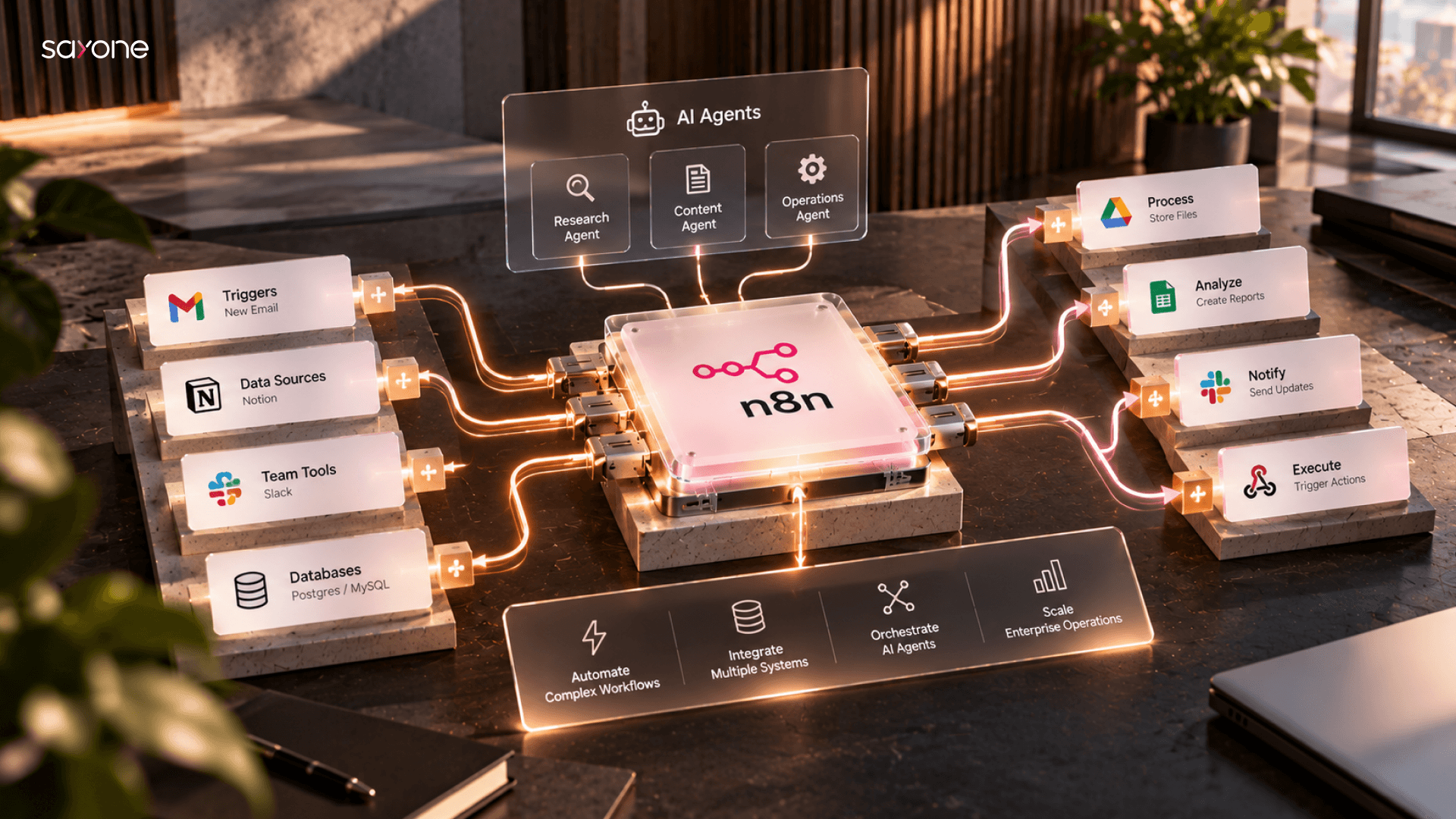
A standard n8n workflow follows a fixed path, where node A always leads to node B, regardless of what happens in between. An n8n AI agent workflow replaces part of that fixed path with a genuine decision point. The core building block is the AI Agent node, documented in the official n8n documentation, which pairs a language model with a defined set of tools, a memory component, and a system prompt that scopes what the agent is permitted to decide.
Three characteristics distinguish an n8n AI agent workflow from ordinary automation:
The agent chooses which connected tool or sub-workflow to call based on the input it receives, rather than following one preset branch every time.
The agent can reference earlier steps in the same conversation or run, so it does not treat every message as an initial state.
A well-built agent has a defined set of skills and a system prompt that defines how flexible it can be when it goes live.
Most production deployments keep the deterministic parts of a process exactly as they are, and introduce an agent only at the specific step where a person would otherwise need to read something and make a judgment call.
Enterprise interest in agentic AI has moved past the experimentation phase. 40 percent of enterprise applications will feature task-specific AI agents by the end of 2026, up from less than 5 percent in 2025. n8n sits at the center of that shift for a specific reason. This allows your team to coordinate decision making by your agents in conjunction with your existing automation of deterministic processes, API interactions, and business logic without building out agent infrastructure from scratch.
Consider a support triage workflow. It does not need an agent to decide whether to log a ticket. It needs an agent to decide how to classify an ambiguous request, which internal tool to check for context, and when to escalate to a person instead of resolving it directly. n8n's node-based canvas lets your team keep the deterministic parts of that workflow deterministic, and hand only the judgment calls to the agent. It keeps the system easier to test, explain, and debug than a fully agentic rebuild.
This is also why n8n AI agent adoption tends to concentrate in specific functions rather than spread evenly across a business. Teams typically start with workflows that already involve some form of triage or classification, since those are the processes where an agent's judgment adds the most value for the least additional risk.
A production n8n AI agent workflow runs on five layers:
Starts the workflow, whether from a webhook, a schedule, a form submission, or another workflow calling it as a sub-workflow.
The AI Agent node itself, configured with a specific model, a system prompt, and a defined scope of responsibility.
Bounded list of activities that the agent can perform, implemented through regular n8n nodes and/or sub-workflows such as looking up a record, sending a message, invoking internal APIs.
Stores relevant context information, which could either be temporary for one execution only or persistent over multiple executions depending on whether remembering past interactions is important for the use case.
Validates input, validates output, requires human approval for sensitive activities, and logs every decision made by the agent.
Teams that build only the agent and tool layers and skip guardrails, tend to ship a workflow that behaves well in testing and inconsistently in production, because nothing is checking its outputs before they reach a customer or a downstream system.
The right starting point depends on how much genuine decision-making a workflow needs, not on how advanced the technology sounds.
| Approach | How It Works | Best Fit | Build Complexity |
|---|---|---|---|
| Traditional automation | Fixed sequence of nodes, no model in the decision path | High-volume, low-ambiguity processes with no real judgment call | Low |
| Single n8n AI agent | One AI Agent node with a scoped tool set handles one decision point | A process with exactly one point of genuine ambiguity, such as classification or triage | Moderate |
| Multi-agent orchestration | Specialized agents hand off to each other across distinct domains | Processes spanning research, drafting, and review, or multiple areas of expertise | High |
A process with a fixed number of steps and no real ambiguity is usually faster and cheaper to build as traditional automation, adding an agent to it only adds cost and unpredictability. Where your use case falls depends on how much genuine judgment it requires:
Autonomy raises the stakes of getting the architecture wrong. Gartner separately predicts that over 40 percent of agentic AI projects will be canceled by the end of 2027, citing escalating costs, unclear business value, and inadequate risk controls as the leading causes. Most of those failures trace back to the same gap: teams treat an agent like a smarter version of a regular workflow, without building the controls an autonomous system actually needs.
The OWASP GenAI Security Project's Top 10 for Agentic Applications names the risks that matter most in practice, including excessive agency, where an agent is given more tool access or decision authority than its task actually requires, and insufficient monitoring of the actions an agent takes once it is deployed.
In an n8n context, that translates into three concrete practices:
A practical rollout moves through four phases rather than attempting a full agentic redesign on day one:
Start with a single, well-bounded decision for the agent to own, not an entire process. A narrow starting point, like ticket classification or lead qualification is easy to test and easy to explain to stakeholders who are new to agentic workflows.
Each tool the agent can call should do exactly one thing, with clear inputs and outputs. An agent can only make good decisions among options that are themselves well-defined.
Define the task that the agent is supposed to do along with its limitations and how the agent should handle situations where there is uncertainty regarding its task. Limit the agent’s access to only those tools that are required by the decision.
Approval steps for high-stakes actions, logging of every agent decision, and a fallback path to a person when the agent's confidence is low or a tool call fails.
Teams that follow this sequence typically reach a working, trustworthy n8n AI agent workflow faster than teams that try to build the full multi-agent system first and retrofit guardrails once something goes wrong in production.
How SayOne approaches n8n AI agent implementation
We treat n8n AI agent workflows as production systems from the first workshop, not as experiments that happen to reach customers. Our n8n workflow automation services cover the full path from scoping a single agent decision through building the tool layer, configuring guardrails, and handing over a workflow your team can monitor and extend on its own.
That approach builds on automation work we have already shipped in n8n, including:
For teams earlier in their agentic AI planning, our guides on deploying agentic AI for business automation and choosing an AI agent development agency cover the decisions that come before implementation.
If your team is weighing where AI agent orchestration fits into your existing n8n workflows, talk to SayOne's automation team before you scope the build, so the agent's boundaries are set by your actual risk tolerance rather than discovered after launch.
A regular n8n workflow executes the same sequence of nodes every time, regardless of context. An AI agent workflow introduces a decision point, where the agent chooses which connected tool or sub‑workflow to call depending on the task.
Absolutely. n8n allows multi-agent orchestration with each agent performing tasks in different domains such as research, drafting, and reviews. If there is just one point of ambiguity in your workflow, then it is preferable that you begin with a single-agent approach.
The n8n AI agent is capable of executing all the tools that have been created using the n8n node or sub-workflow. In order to make sure that the tool executes properly without error, all the tools must be limited and well-defined with input and output parameters.
Control measures include using narrowly scoped tools, logging every decision for human review, and requiring human approval for irreversible actions. The OWASP Top 10 for Agentic Applications highlights excessive agency and insufficient monitoring as the most common risks.
Industries with workflows involving classification, triage, or contextual decision-making benefit most. The examples include customer support, finance, e-commerce and healthcare operations.
We're committed to your privacy. SayOne uses the information you provide to us to contact you about our relevant content, products, and services. check out our privacy policy.

We collaborate with visionary leaders on projects that focus on quality